Documentation Index

Fetch the complete documentation index at: https://docs.clicks.tech/llms.txt

Use this file to discover all available pages before exploring further.

Clicks Shortcuts For Android
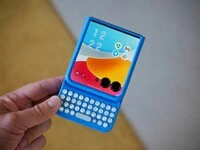
Android smartphones are loved for the choice and control they offer when it comes to hardware and software customization. In that spirit, the Android community will love the powerful keyboard shortcuts unlocked by Clicks that offer ultimate control over the Google Pixel, Moto Razr or Samsung Galaxy S25. Best of all, there’s no setup required as loads of keyboard shortcuts come built in on Android. Here’s a running list of our favorites. If you spot a shortcut not listed here drop us an email to founders@clicks.tech and we’ll add it to the list!
ActionShortcut Combo
Lock phoneMeta Key + L
Show notificationsMeta key + N
Return to home screenMeta key + Return
Go backMeta key + Delete
Show recent appsAlt + Clicks (tab)
Show all appsMeta key + ctrl

Launch your favorite apps

ActionShortcut Combo
Open Browser (Chrome)Meta key + B
Open ContactsMeta key + C
Open GmailMeta key + G
Open CalendarMeta key + K
Open MusicMeta key + P
Open MessagesMeta key + S
Open YouTubeMeta key + Y
Open CalculatorMeta key + U
Open SettingsMeta key + I
Open MapsMeta key + M

AI at your fingertips

ActionShortcut Combo
Ask GeminiMeta key + A

In-App shortcuts

Chrome Browser

ActionShortcut Combo
Open TabCtrl + t
RefreshCtrl + R
Save pageCtrl + S
Bookmark pageCtrl + D
Browser historyCtrl + H
New windowCtrl + N
Go backMeta key + Delete

Gmail

WhereActionShortcut Combo
Within an emailCompose a new emailc
Within an emailReplyr
Within an emailReply alla
Within an emailForwardf
When composing emailSend an emailCtrl + Enter
When composing emailSave a draftCtrl +s
When composing emailClose compose and saveCtrl +w
Within an emailArchive an emaile
With an emailDelete#
In inboxRefresh your inboxCtrl + u
Edit textCutCtrl + x
Edit textCopyCtrl + c
Edit textPasteCtrl + v
Edit textSelect allCtrl + a

Google Calendar

ActionShortcut Combo
Jump to TodayCtrl + T
MetaCtrl + F
Go to dateCtrl + G
Create a new eventCtrl + N
Edit an eventCtrl + E

Google Keep (Notes)

ActionShortcut Combo
Archive notee
Trash noted
Pin or unpin notesf
Select noteShift + Enter
Open noteSpace
Toggle between list and grid viewCtrl + g
Compose a new noteCtrl + n
Compose a new listCtrl + l

Motorola Razr external screen shortcuts

A quick note that not all the shortcuts listed above work on the Moto Razr external screen. But, here are some of the ones we know that do.
ActionShortcut Combo
Launch Gemini AI AssistantPress Gemini key
Go backMeta key + DEL
Return to home screenMeta key + h
Launch GmailMeta key + g
Launch calendarMeta key + l
Launch ChromeMeta key + b
Launch contactsMeta key + c
Launch mapsMeta key + m
Launch YoutubeMeta key + y
Launch musicMeta key + p
Launch messagesMeta key + s
Launch calculatorMeta key + a
Launch Gemini AI AssistantPress Gemini key

Read more

android-hero-2.173

Clicks brings its award-winning iPhone keyboard case to Android phones

Clicks brings its award-winning iPhone keyboard case to Google, Motorola and Samsung smartphones. Smart keyboard accessory offers a premium typing experience, added screen real-estate and powerful keyboard shortcuts. Available to pre-order today from USD $49.
1._clicks_for_pixel_-_pixel_perfect_productivity

Introducing Clicks for Pixel: More Control. More Screen. More You.

Since launching Clicks for iPhone in 2024, we’ve heard from passionate Pixel owners that they want the benefits of buttons. With the announcement of Clicks for Pixel, we’re giving pixel a productivity power-up.
2._clicks_for_razr_in_hand

Meet Clicks for Razr: A keyboard you’ll flip for.

Clicks for the Motorola Razr transforms the foldable experience — unlocking full-screen productivity while keeping Razr ultra-pocketable. Best of all, Clicks adds a real keyboard that lets you type, navigate, and take control — all from the external display.
clicks_shortcuts_for_android

Clicks is a command center for your Android smartphone

The Clicks Keyboard for Android is here. Learn how to use keyboard shortcuts to launch apps and navigate your Android phone.