

Documentation Index
Fetch the complete documentation index at: https://docs.clicks.tech/llms.txt
Use this file to discover all available pages before exploring further.
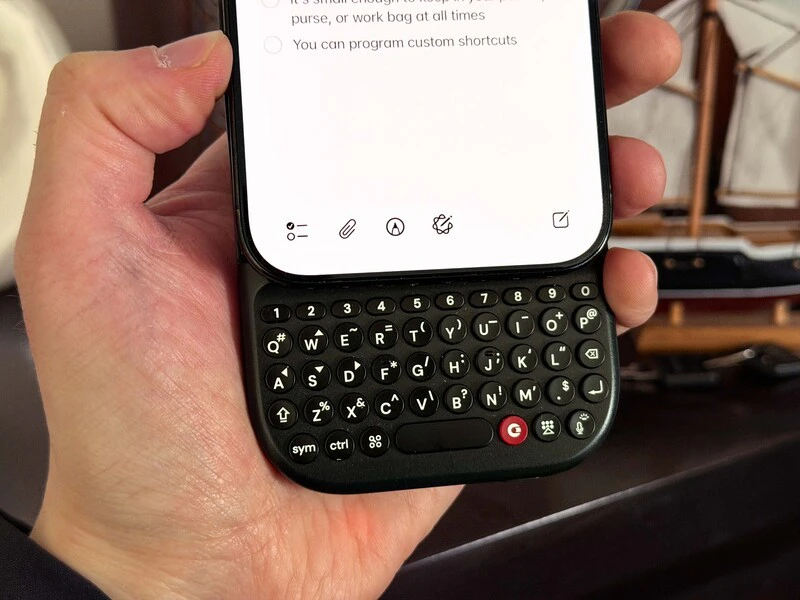
The Magic of MagSafe
MagSafe is a magnetic technology built into the internal engineering of every iPhone since the iPhone 12. It consists of a precision-aligned ring of magnets surrounding the wireless charging coil. For the Power Keyboard, MagSafe serves two vital purposes:- Secure Attachment: It physically locks the keyboard to the back of your iPhone, ensuring it stays stable while you type.
- Wireless Power: It aligns the keyboard’s internal 2,300 mAh battery perfectly with your iPhone’s charging coil to provide a wireless “top-up” while you work.
iPhone Compatibility & Slider Positions
The Power Keyboard features a multi-position slider. This allows you to adjust the physical “drop” of the keyboard to match the height of your specific iPhone, ensuring an ergonomic grip regardless of your phone’s size.| iPhone Model | Wireless Protocol | Native Magnet? | Slider Position |
|---|---|---|---|
| iPhone 17 Pro Max / Plus | MagSafe / Qi2 | YES | Extended |
| iPhone 17 Pro / iPhone 17 | MagSafe / Qi2 | YES | Standard |
| iPhone Air | MagSafe / Qi2 | YES | Standard |
| iPhone 16 Pro Max / Plus | MagSafe / Qi2 | YES | Extended |
| iPhone 16 Pro / iPhone 16 | MagSafe / Qi2 | YES | Standard |
| iPhone 15 Pro Max / Plus | MagSafe / Qi2* | YES | Extended |
| iPhone 15 Pro / iPhone 15 | MagSafe / Qi2* | YES | Standard |
| iPhone 14 Pro Max / Plus | MagSafe / Qi2* | YES | Extended |
| iPhone 14 Pro / iPhone 14 | MagSafe / Qi2* | YES | Standard |
| iPhone 13 Pro Max | MagSafe / Qi2* | YES | Extended |
| iPhone 13 / 13 Pro | MagSafe / Qi2* | YES | Standard |
| iPhone 13 mini | MagSafe / Qi2* | YES | Standard |
| iPhone 12 Series (all) | MagSafe / Qi2* | YES | Model Dependent |
| iPhone 16e | Qi (No MagSafe) | NO | Requires Mag Case |
Working with Existing Cases
You don’t need to take your phone out of its case to use the Power Keyboard. Because it uses magnetic induction, it is compatible with any MagSafe-certified case.Note: For the best experience, we recommend using a slim magnetic case. Thicker, non-magnetic cases may weaken the magnetic bond and prevent the keyboard from staying securely attached during heavy typing sessions.
Landscape Mode: The Third Position
Beyond the Standard and Extended vertical positions, the Power Keyboard slider supports Landscape Rotation. This is perfect for iPhone users who want a wider view for:- Editing detailed spreadsheets.
- Managing long-form email threads.
- Drafting articles in a distraction-free, wide-screen environment.
Beyond iPhone
By extending your battery life and adding the productivity of a tactile keyboard, Clicks Power Keyboard brings a consistent, confident typing experience to your iPhone. It can help you harness the built-in iOS keyboard shortcuts (which most people don’t even realize are baked right into the operating system) and for anyone who “walks in both worlds” (iPhone smartphone, other accessories) it can also be paired with an iPad, Apple TV, or Vision Pro.Read more
Samsung's Phones Don't Have Magnets But You Can Still Use Power Keys
The Clicks Power Keyboard relies on a high-strength magnetic connection to “snap” onto the back of your smartphone. While this is a native feature for some devices, Samsung Galaxy phones just refuse to adopt this feature. Having a built-in magnetic ring in the chassis is standard with many other phones, but not galaxy devices. At least not as of 2026. Having no magnetic ring on…
Which Phones is the Clicks Power Keyboard Compatible With?
One of the most frequent questions we receive is whether the new Clicks Power Keyboard will fit a specific phone model. While our original keyboard cases were precision-engineered for specific flagship models. The Power Keyboard marks a significant shift toward universal, cross-device compatibility. Because Power Keys uses a magnetic attachment system rather than a wrap-around…
Clicks Power Keyboard: The Samsung Galaxy Compatibility Guide (2021–2026)
One of the most frequent questions we get at Clicks is: “Will it fit my phone?” With the launch of the Clicks Power Keyboard, the answer is almost certainly yes. Unlike our original case-style keyboards, the Power Keyboard uses a universal magnetic slider. This means that as long as your phone has a way to attach to a magnet (built-in, through a compatible case, or by adding a magnetic…
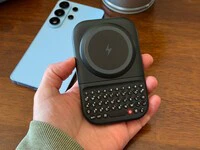
The Samsung Users' Guide to Clicks Power Keyboard
For years, the Samsung Galaxy experience has involved a silent trade-off. We gained some of the most stunning mobile displays in the world, but we keep losing that real estate to the digital keyboard any time we try and get stuff done. The moment you need to reply to a Slack message or draft an email, that virtual keyboard slides up and consumes nearly half of that beautiful Infinity…